Reviews · Reference
Review widget filters, design controls, live embeds, and eligibility
Set Minimum rating to 5+ stars to show only eligible five-star Google reviews. Saving updates the same public widget ID; reload an installed widget to fetch the updated configuration, subject to caching.
What this does
Set Minimum rating to 5+ stars to show only eligible five-star Google reviews. Saving updates the same public widget ID; reload an installed widget to fetch the updated configuration, subject to caching.
Before you start
- Reviews Widgets and Creative Studio access are both required; publishing needs editor access to both.
- Public reviews must be approved, unexpired, not hidden or awaiting moderation, and have a direct source link.
Steps
- Open Reviews Widgets at the intended group or location.
- Choose a template and configure Minimum rating, Maximum reviews, Text length, and Rotate every.
- Adjust visible content and appearance, then inspect the device previews.
- Enable public widget and save. Wait for the saved notice before copying the live embed.
- Install the chosen embed once. Later configuration saves retain its ID; reload the website to fetch changes.
Current screenshot

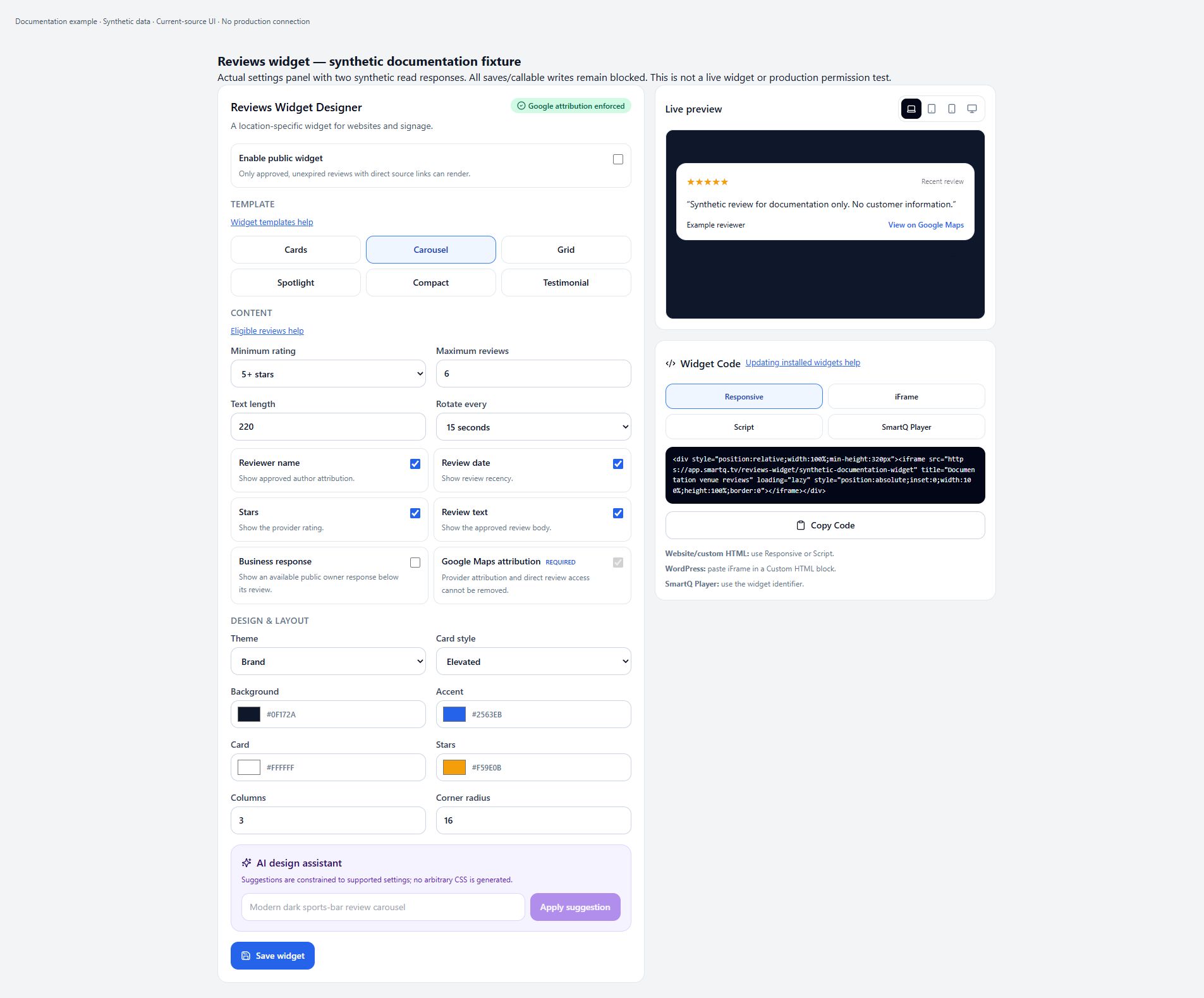
Minimum rating: only five-star reviews
Minimum rating offers 5+, 4+, 3+, 2+, and 1+ stars and defaults to 4. Choose 5+ stars and save to restrict public results to five-star reviews that also pass approval, expiry, moderation, and source-link checks. This is a minimum threshold, not a selection of arbitrary rating buckets. An eligible five-star review can still be absent because the endpoint scans a limited set before sorting; increasing the threshold does not fetch the entire historical catalog.
Maximum reviews
Maximum reviews defaults to 6 and is clamped to 1–12 by both frontend and server normalization. It limits the eligible returned list, not the number of reviews on Google. Cards/Grid-style output can show multiple returned reviews; Carousel rotates one at a time, while Spotlight and Testimonial show only the first returned review. The server sorts eligible scanned reviews newest first, but scans at most 50 documents per selected location before sorting.
Text length
Text length defaults to 220 characters and is clamped to 40–500. The public endpoint truncates both review text and an included business response to that maximum; it does not alter the original Google review. The renderer may further clamp visible lines. If a preview seems shorter than the saved character limit, distinguish the returned text limit from visual layout truncation.
Rotate every
Rotate every offers 8, 12, 15, 20, 30, 45, or 60 seconds; the default is 15. Normalization bounds it to 8–60. Public timed rotation only runs for the Carousel template and at least two returned reviews. Spotlight/Testimonial remain on the first review, and multi-card templates do not use this carousel timer. A single eligible review therefore will not visibly rotate regardless of the interval.
Template
Cards, Carousel, Grid, Spotlight, Compact, and Testimonial are the six selectable template IDs; the default is Carousel. The public renderer treats Carousel as one-at-a-time rotation and Spotlight/Testimonial as the first-review presentation. Other template IDs use the multi-review branch. A different template label does not guarantee a completely distinct layout in every consumer; inspect the installed public widget as well as the editor preview.
No public reviews despite an editor preview
The public endpoint requires Google source, display.approved true, not hidden, no moderationRequired flag, rating at or above the minimum, future ingestion expiry, and a direct source URL other than the generic Google Maps homepage. The editor loads recent reviews with minRating 1 and can show a sample when none are returned; it is not the public eligibility test. Check the actual public embed before concluding that reviews are published. Resolve approval or provider freshness through the supported Reviews workflow; contact Support for unexplained missing eligible reviews.
Do I replace the embed code after changing settings?
No: updating an existing widget preserves its public ID and rewrites its live settings and public lookup. The UI confirms that the embed points to this live configuration. The public page fetches once when its ID loads; it does not poll for later configuration saves. Reload the installed page to fetch updates. The API allows 60 seconds of public caching plus 300 seconds of stale-while-revalidate, so neither changes nor disabling are an instantaneous cache-revocation guarantee.
Enable public widget and Widget not found
Enable public widget is initially false for a new record. Save persists the toggle alongside settings. A disabled/missing public lookup, missing/disabled widget record, or mismatched public ID returns Widget not found (404) on a fresh API response. Disabling does not erase the saved design or change the ID. An already loaded embed can remain visible until it reloads; cached responses may also delay the visible result. Re-enable and save only if publication is intended.
Group and location widget scope
A location widget uses its location as scope ID and one location in its public data list. A group widget uses the group as scope ID and saves the deduplicated authorized location list, limited to 25 locations. Empty selections fail with Choose at least one authorized Reviews location; unauthorized selections fail with A selected location is outside your scope. These are separately keyed widget designs, not an automatic parent-design inheritance/override chain.
Why widget editing or publishing is blocked
Review widget access also requires Creative Studio access. Publishing requires Creative Editor access in addition to Reviews Widgets write authorization. Group-level operations require parent-group Reviews access. A user who can read Reviews but cannot publish a widget should ask an account administrator to review both permissions and scope; do not grant broader access solely to make the button enabled. The frontend disables controls while loading, saving, or when canWrite is false.
Google Maps attribution cannot be turned off
Google Maps attribution is a Required, locked toggle in the editor. Frontend and server normalization force googleAttribution true, and the public output includes direct source links and Google Maps attribution. Changing other appearance controls does not authorize removal of that attribution. The absence of eligible direct source links can prevent a review from being returned publicly.
Permissions and scope
- Reading requires Reviews Widgets access plus Creative Studio access. Writing requires editor access to both. Group widgets additionally require parent-group access; each selected location is authorized separately.
Mobile
- An inspected 390 CSS pixel current-source fixture shows stacked content/design fields, wrapped help links, a full-width Save widget button, and preview/embed code below the form instead of the desktop side column. This is a real narrow browsing-context layout, not a physical-device or production capture. The editor's separate mobile/tablet/desktop/TV preview buttons simulate the public widget width; they do not switch Admin navigation. Public CSS also collapses multi-column layouts on small viewports.
What happens next
Verify the saved result in the correct scope and delivery path. A preview or status badge is not proof that every production Player has refreshed.
Warnings
- This source-reviewed guide describes the named paths only. Operational coverage and production visual verification are still in progress.