AdNet · Getting Started
AdNet advertiser portal account and navigation
The separate AdNet portal is an invite-only advertiser/agency workspace with Network Overview, Assets, Location Network, Audience Signals, Delivery Analytics, Billing, and Settings.
What this does
The separate AdNet portal is an invite-only advertiser/agency workspace with Network Overview, Assets, Location Network, Audience Signals, Delivery Analytics, Billing, and Settings.
Steps
- Sign in with the invited advertiser or agency identity, or use the authorized BevQ brand handoff.
- Wait for account-access validation.
- Use desktop navigation or the mobile navigation menu.
- Review notifications and open the relevant workspace.
- If Access pending appears, contact the SmartQ representative responsible for activation.
Current screenshot
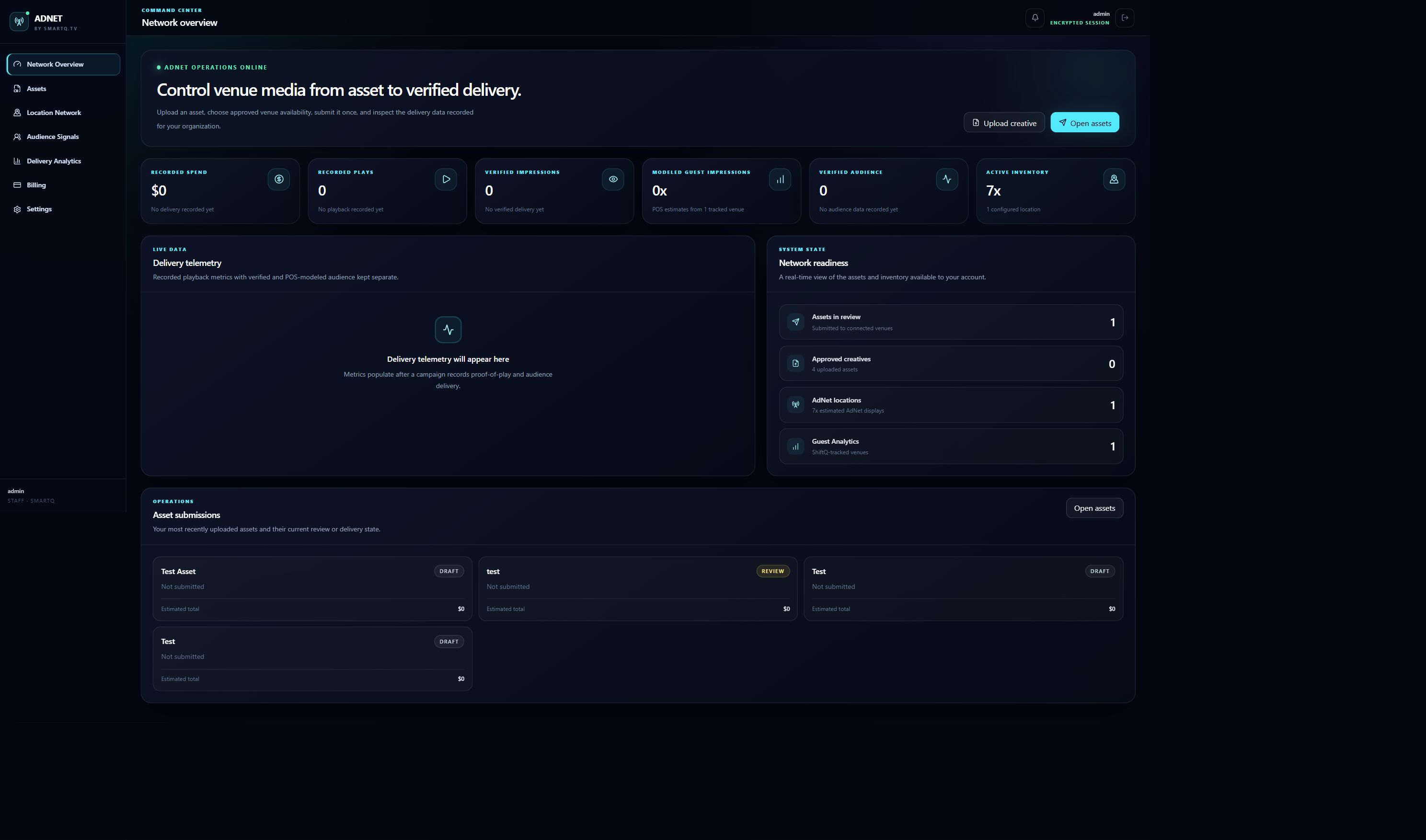
Settings reference
Account/profile and notification settings apply to the advertiser account. Brand connection state reflects authorized handoffs and does not create venue management access. This control is covered by the AdNet advertiser portal account and navigation workflow.
Mobile navigation
Use Open navigation in the header; select a page and the drawer closes. Notification actions remain in the header menu.
Settings reference
| Setting | What it does | Default | Scope | Notes |
|---|---|---|---|---|
| Account and notification preferences | Configures account and notification preferences. | Current product default shown in the UI | current account | Requires active advertiser/agency; displayed choices are authoritative for the current account and release. |
Mobile
- The portal uses a collapsible navigation drawer on narrow screens; no workflow is intentionally desktop-only.
Customer-visible states
- loading
- signed out
- access pending
- active
- notification unread
- save error
Email/identity-provider sign in
This control is covered by the AdNet advertiser portal account and navigation workflow.
Applies to /login
Invite-only and access-pending states
This control is covered by the AdNet advertiser portal account and navigation workflow.
Applies to /login
Authentication errors
This control is covered by the AdNet advertiser portal account and navigation workflow.
Applies to /login
Brand handoff
This control is covered by the AdNet advertiser portal account and navigation workflow.
Applies to /bevq-sso
Account status and network metrics
This control is covered by the AdNet advertiser portal account and navigation workflow.
Applies to /app
Campaign/asset delivery summary
This control is covered by the AdNet advertiser portal account and navigation workflow.
Applies to /app
Loading, empty, and access-pending states
This control is covered by the AdNet advertiser portal account and navigation workflow.
Applies to /app
Brand/account connection status
This control is covered by the AdNet advertiser portal account and navigation workflow.
Applies to /app/settings
Save, validation, and permission states
This control is covered by the AdNet advertiser portal account and navigation workflow.
Applies to /app/settings
What happens next
Your change is available within the scope you selected.
Warnings
- An authenticated identity is not enough: the advertiser/agency profile must also be active.
Troubleshooting
- Access pending means the identity is recognized but the AdNet profile is not active.
- An invalid BevQ handoff can result from an expired one-time session, wrong brand, or missing advertiser eligibility.
- For expired, invalid, and unavailable handoff states, verify the selected scope, access level, required connection, and displayed validation or freshness status; retry once after correcting the cause, then create a context-rich Support case if it continues.
- For invite-only and access-pending states, verify the selected scope, access level, required connection, and displayed validation or freshness status; retry once after correcting the cause, then create a context-rich Support case if it continues.
- For authentication errors, verify the selected scope, access level, required connection, and displayed validation or freshness status; retry once after correcting the cause, then create a context-rich Support case if it continues.
- For invalid, expired, and unauthorized session states, verify the selected scope, access level, required connection, and displayed validation or freshness status; retry once after correcting the cause, then create a context-rich Support case if it continues.
- For loading, empty, and access-pending states, verify the selected scope, access level, required connection, and displayed validation or freshness status; retry once after correcting the cause, then create a context-rich Support case if it continues.
- For save, validation, and permission states, verify the selected scope, access level, required connection, and displayed validation or freshness status; retry once after correcting the cause, then create a context-rich Support case if it continues.